WAIvePulse Looper: A Free Loop Station in Your Browser
A loop station lets you record a few bars, have them repeat, and stack more parts on top. Hardware ones cost real money. This one is a web page.
I pulled the Looper out of my WAIvePulse music studio so anyone could use it without installing the whole thing. All of the sound is made inside your browser. Nothing is uploaded, and there is no signup.
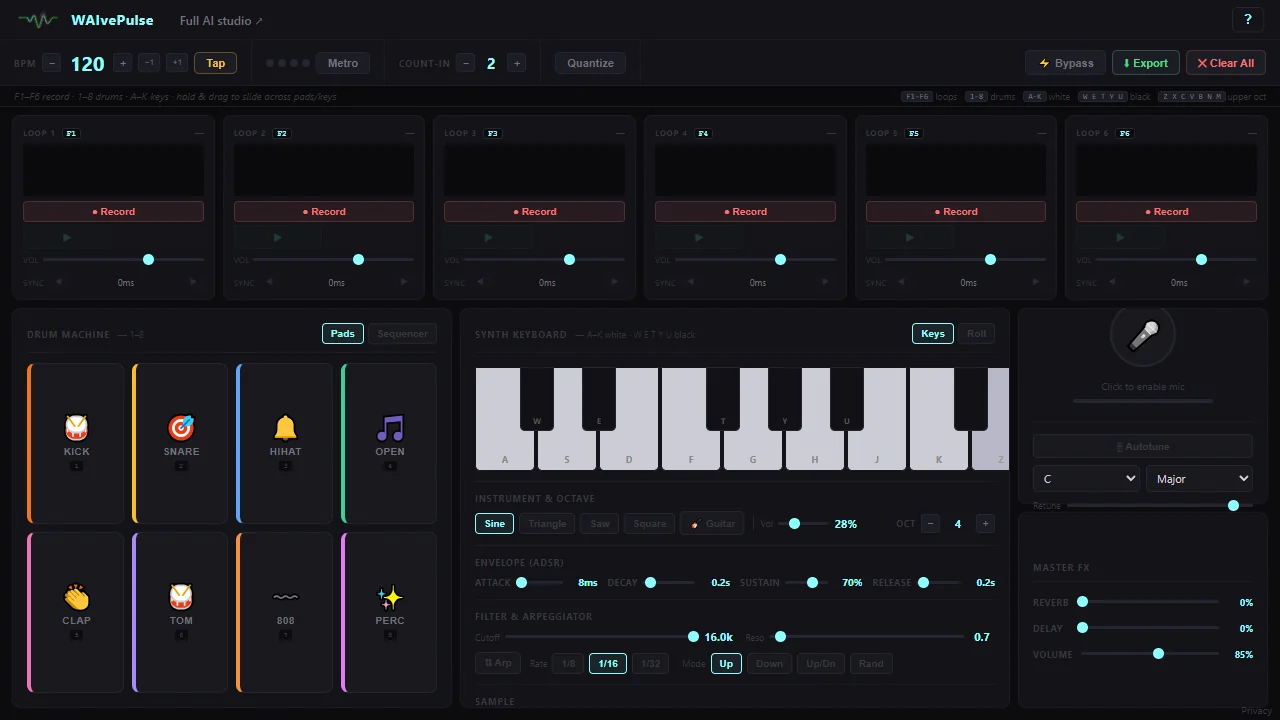
What you get
- Six loop slots. Record, play and clear each one. Set its volume and nudge its timing.
- Drums. Eight pads on the number keys.
- Synth and keys. Play notes from the computer keyboard, white keys and black keys both.
- Piano roll with live sheet music. See the notes you played written out as you go.
- Guitar, sampler and mic. Record your own voice or instrument into a loop.
- Timing help. Set the BPM or tap it in, turn on the metronome, pick a count-in, and quantize a loop to tidy it up.
- Export. Save what you made.
Keys to know
| Keys | What they do |
|---|---|
| F1 to F6 | Record into loop 1 to 6 |
| 1 to 8 | Drum pads |
| A to K | White keys |
| W E T Y U | Black keys |
| Z to M | The octave above |
It is built for a desktop browser first. Use headphones if you plan to record with the mic, so the loops do not bleed back in.
Want the songs written for you too? The full WAIvePulse studio generates music with vocals on your own graphics card, and that is free as well.
music
looper
browser
free tool
Comments